GOOGLE PLAY POLICY

Google Play Deceptive Behavior: Remediation Checklist

The hardest part is not the wording of the policy — it’s how reviewers interpret “misleading”. Don’t argue intent. Make the flow verifiably transparent: clear entry points, clear triggers, clear pricing, clear ads, clear permissions, and clear external redirects.

Get Expert AdviceSee Google Play Rejection Guide

Common Triggers (Start Here)

If you hit two or more, reviewers often label the app as misleading. Fix behavior first, then align store assets and notes.

01 Promise vs. Reality

Store listing says “free / no ads / offline”, but the app immediately shows a paywall, forces ads, or blocks core functionality. Reviewers focus on the first-minute experience.

02 UI Mimics System Dialogs

Popups and buttons look like OS updates or system permission prompts, making users unsure whether it’s inside the app. Even without malicious intent, this is a risk.

03 Subscription Not Transparent

Price, trial, renewal and cancel rules are buried, or paywalls are triggered behind vague buttons like “Continue”. This is commonly flagged as deceptive design.

04 Ads/Redirect Flow Confusion

Primary CTA unexpectedly opens an ad landing page or external site, breaking the user’s flow. Reviewers assess whether users could be misled about what just happened.

Visual Breakdown: From “Misleading” to “Verifiably Clear”

Reviewers don’t read long explanations — they replay your flow. These two diagrams compress what matters into a reproducible checklist.

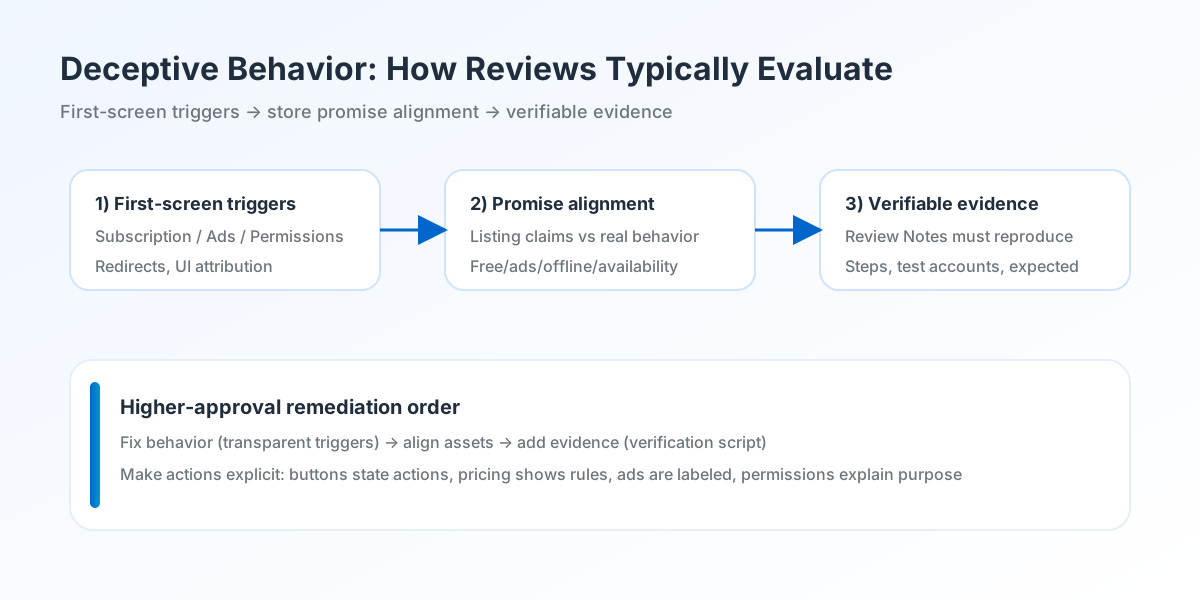
Deceptive Behavior review flow
Figure 1: Typical review flow. Reviewers start with the first screen and key triggers (subscription, ads, permissions, redirects), then compare behavior against store promises. If “promise vs behavior” breaks, explanations rarely help.
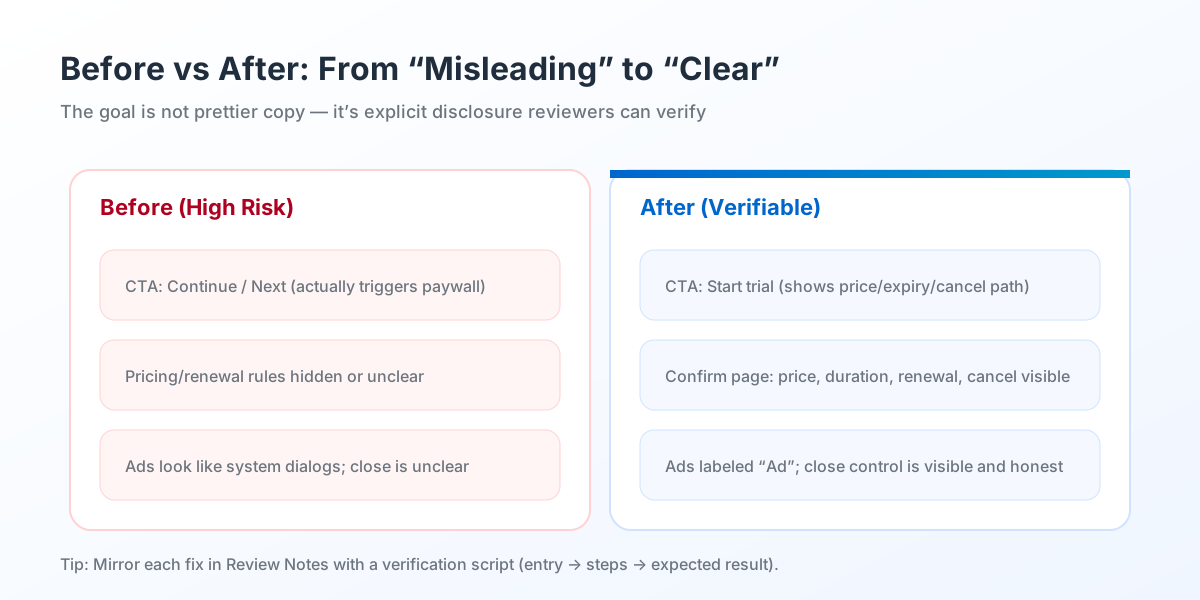
Before/after remediation comparison
Figure 2: Before/after. Remediation means turning hidden triggers into explicit disclosure: buttons describe actions, pricing rules are visible, ads are labeled, permissions explain purpose before prompting.

Executive Summary

Deceptive Behavior is about whether users can be misled — not your intent. The fastest path to approval is to make every contentious moment transparent and reproducible. In practice, split the problem into four buckets: promise alignment (store vs in-app), trigger transparency (subscription/ads/permissions/redirects), UI attribution (in-app vs system-like dialogs), and verifiable evidence (notes that let reviewers reproduce). Clear those buckets end-to-end and approval rates become much more stable.

Don’t forget evidence. Many teams fix the product but write “we optimized” in Review Notes. If reviewers can’t verify, they reject again. Write each fix like a script: where to enter, what to tap, what you expect to see.

  • Fix behavior first, then update store assets.
  • Turn each issue into a reproducible verification path.
  • Clean edge cases in one pass to reduce repeated policy hits.

8-Step Plan Before Submission

  • Convert the rejection into actionable issues: which screen, which trigger, what users could misunderstand.
  • Audit store promises vs in-app reality (free/ads/subscription/feature availability) and document “claim → evidence”.
  • Make paywalls explicit: button labels match actions; confirmation shows price, duration, renewal, and cancel path.
  • Label ads clearly and avoid system-like styling; close controls must be visible and non-misleading.
  • Make external redirects explicit: warn users before leaving the app; avoid redirecting from primary flow CTAs.
  • Explain permissions before prompting: purpose and timing first, then the OS dialog.
  • Update screenshots and description to match the corrected flow; remove exaggerated or ambiguous claims.
  • Write Review Notes as a script: issue → fix → verification path → expected result; add test accounts/region notes if required.

FAQ

What usually triggers a Deceptive Behavior rejection?+
Most rejections come from unclear triggers or mismatches between store promises and real behavior, especially around subscriptions, ads, permissions, and redirects.
Is changing copy and screenshots enough?+
If the issue is behavior (paywall trigger, ad design, redirect flow), store-only edits rarely work. Fix the product flow first, then align assets.
Do I need to provide a test account?+
If your flow requires login, region access, or whitelisting, provide a test account and region notes. Otherwise reviewers may mark the fix as non-verifiable.
How long should Review Notes be?+
Short but reproducible. A clear verification script beats long explanations.
How do I reduce repeat rejections and account risk?+
Fix edge cases in one pass, avoid rapid resubmission loops, and ensure Data Safety and permission disclosures are aligned with behavior.