APP STORE GUIDELINE 5.1.1

App Store 5.1.1 Privacy Rejection Fix Checklist

5.1.1 is not really about whether you uploaded a privacy policy. It is about what you collect, why you collect it, when you collect it, and whether users are clearly informed. If your disclosures and real behavior do not match, review friction rises fast.

Get Expert AdviceSee iOS Rejection Guide

Common 5.1.1 Triggers

When these issues appear, do not patch a single document. Align permissions, questionnaire answers, policy copy, and the real in-app flow together.

01 Questionnaire vs. Real Behavior

You say “no data collected” in App Store Connect, but analytics, ads, crash reporting, or attribution SDKs still transmit identifiers or event data. Apple can detect that inconsistency quickly.

02 Permission Purpose Strings Are Too Vague

Camera, photos, location, or microphone prompts say “improve experience” without tying the request to a visible feature. Reviewers often ask for a clearer functional reason.

03 ATT Timing Is Too Aggressive

ATT appears on first launch before users understand the product context, with no pre-prompt or explanation. Even if not automatically disallowed, it is hard to justify.

04 Policy Page Looks Generic

The privacy page uses broad template language but does not explain actual data types, third-party SDKs, retention, deletion path, or concrete processing purposes.

Visual Breakdown: What Apple Cross-Checks

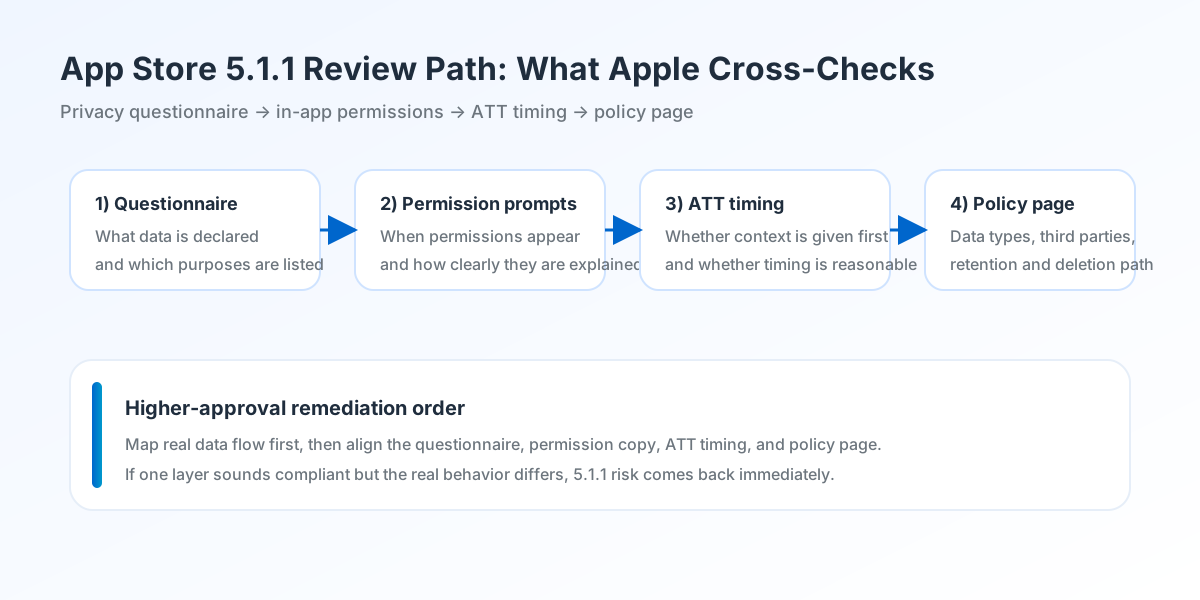
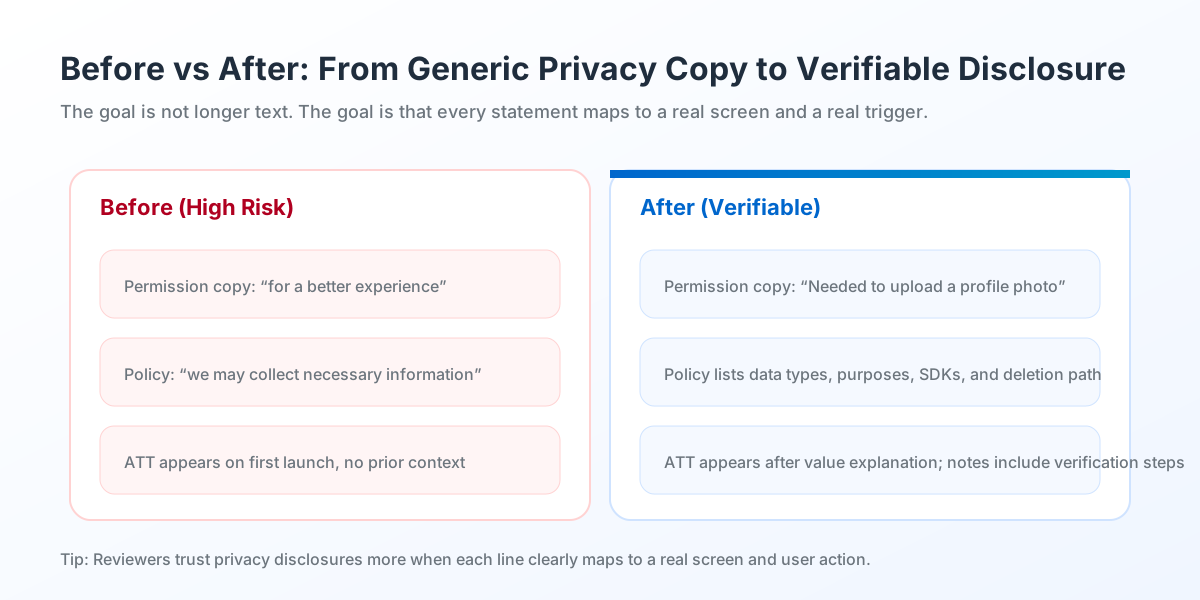
The two diagrams below show the real review logic. Apple is not checking whether a page exists. It is checking whether your privacy story is consistent and verifiable.

App Store 5.1.1 review path
Figure 1: Review path. Apple often cross-checks the privacy questionnaire, in-app permission triggers, ATT timing, and the policy page. Any mismatch between these layers can trigger 5.1.1.
App Store 5.1.1 before after comparison
Figure 2: Before vs. after. Strong remediation is not about saying more. It is about saying specific, verifiable things: when data is collected, what is collected, why it is needed, and how users can opt out or delete.

Executive Summary

The real purpose of App Store 5.1.1 is to let reviewers decide, very quickly, whether your data collection is transparent, whether your permissions are reasonable, and whether your explanations can be verified. Many teams are not failing because they did nothing. They fail because each piece says something different. The privacy questionnaire is conservative, while the app still runs analytics or ad SDKs. The policy page mentions location, while the app asks for permission in an unrelated moment with no explanation. That kind of fragmented disclosure is what creates rejection risk.

The stronger remediation approach is to treat privacy as one aligned flow. Start with the real data map: what is collected, by which SDK, on which screen, and for what purpose. Then align your App Store privacy questionnaire, permission purpose strings, ATT timing, policy page, and account deletion path. Only after those are unified should you write Review Notes explaining what changed and how Apple can verify it.

  • Map real data flow first. Write declarations second.
  • Permission prompts should point to a specific visible feature, not generic “better experience” wording.
  • The questionnaire, ATT flow, privacy policy, and in-app behavior must tell the same story.

8-Step Plan Before Submission

  • Create a data-flow sheet: what data is collected, where it is collected, which SDK handles it, and why.
  • Compare every real behavior against App Store Connect privacy answers and correct mismatches.
  • Rewrite permission purpose strings so each one maps to a concrete user-facing feature.
  • Review ATT timing: add context first, then trigger the system dialog at a defensible moment.
  • Expand the privacy policy with data types, purposes, third parties, retention/deletion, and contact details.
  • If your app has accounts, add a visible account deletion path or a clear deletion request route that Apple can verify.
  • Align screenshots, listing copy, and feature claims with your actual privacy behavior; avoid exaggerated “no data collected” claims.
  • Write Review Notes in four blocks: data disclosure, permission trigger, ATT timing, and verification path.

FAQ

What usually triggers a 5.1.1 rejection?+
Most often it is a mismatch between declared and actual data behavior, vague permission copy, poor ATT timing, or a policy page that does not describe how the app really handles data.
Is adding a privacy policy enough?+
Usually not. Apple reviews the questionnaire, permission flow, ATT timing, policy page, and sometimes account deletion flow as one combined privacy story.
When should ATT appear?+
It is usually safer after users understand the value context. A pre-prompt explanation before the system dialog often works better than showing ATT immediately on first launch.
What should Review Notes include?+
Explain what data is collected, where permissions are triggered, where ATT appears, where the privacy policy lives, and how reviewers can verify the updated flow.
How do I reduce repeat privacy rejections?+
Fix the questionnaire, permission copy, policy page, SDK behavior, and in-app flow together. Partial edits are the main reason privacy issues come back on the next review.